
Passkeys Explained in 2026: Sign-In, Sync and Recovery
What is a passkey? It is a sign-in credential based on a cryptographic key pair. Your device or passkey manager keeps the private key; the website stores a public key and uses it to verify a signed challenge when you log in. You approve the sign-in by unlocking your device with a fingerprint, face scan, PIN, or password. The website does not receive your biometric data. This design makes ordinary password phishing much harder, but recovery and fallback methods still deserve attention.
Passkeys are no longer a niche experiment. In its May 2026 State of Passkeys announcement, the FIDO Alliance estimated five billion passkeys in use worldwide and reported that 75% of surveyed consumers had enabled one on at least one account. Those are the Alliance's estimates and survey results, not a count of unique people. The more useful question for your own account is how a passkey works when you change phones, use another computer, or lose access.
What happens when you create a passkey
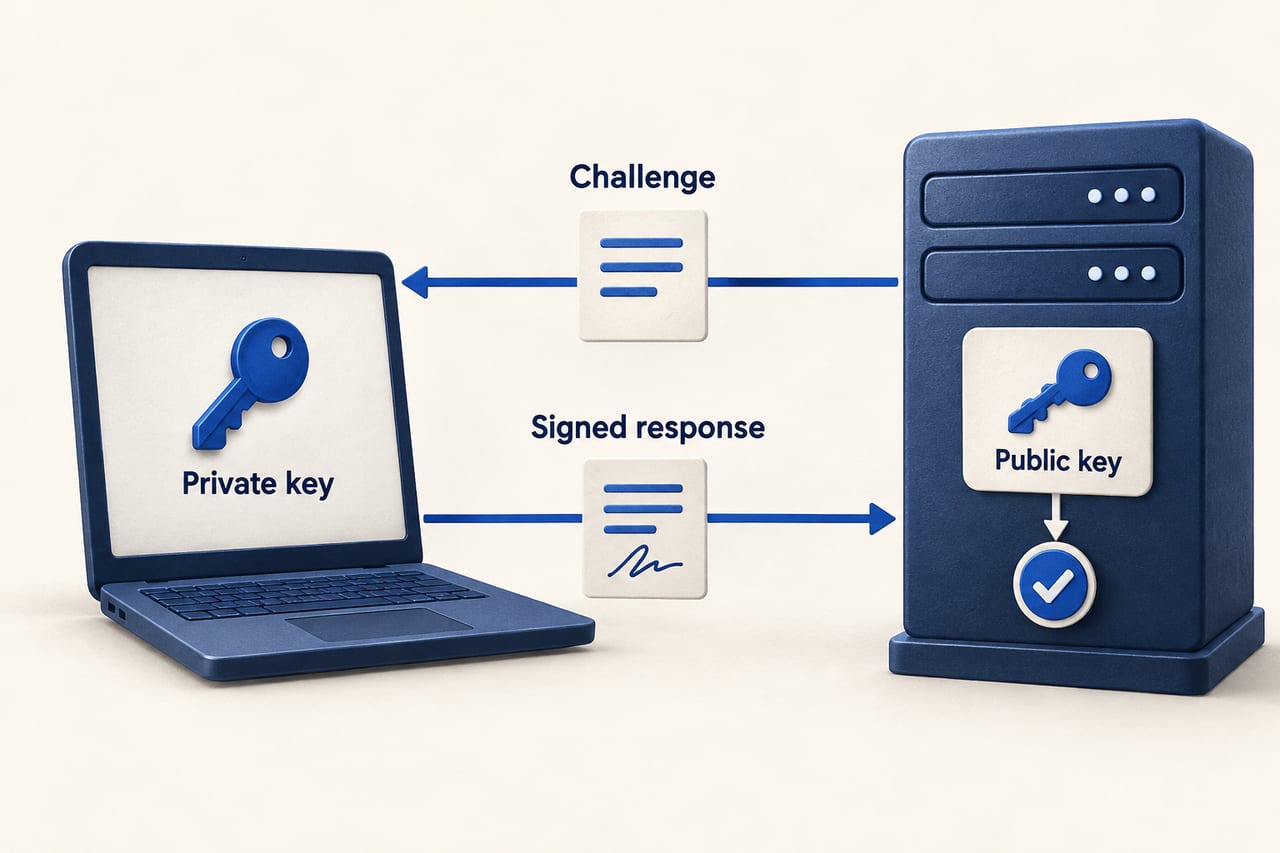
You sign in to a site using its existing method and choose to add a passkey. Your device creates a private key and a matching public key for that site's identity. The site receives the public key and associates it with your account. The private key stays under the control of your device or passkey provider. Google's passkey overview describes this public-private key design and explains why a stolen database of public keys does not give an attacker the secret needed to sign in.
At the next login, the site sends a fresh challenge. Your device asks you to unlock it, uses the private key to sign the challenge, and returns the signed result. The site verifies that result with its stored public key. This is why a passkey is not “your fingerprint stored on a website.” The fingerprint or PIN unlocks access to a credential on your side; Google says biometric material never leaves your device as part of passkey sign-in.
Why passkeys resist phishing
A password can be typed into a convincing fake login page. A passkey is bound to the real website or app identity. The browser and operating system check that identity before offering the credential, so a lookalike domain cannot simply ask your passkey to sign in as if it were the real service. The FIDO Alliance passkey explanation calls this phishing-resistant sign-in.
That benefit has limits. If an account still allows a weak password reset by email or SMS, an attacker may target the fallback instead of the passkey. A passkey also cannot stop you from approving a fraudulent payment inside a real account, or from handing sensitive information to a scammer. It protects the authentication step, not every decision after login.
Synced and device-bound passkeys are different
A synced passkey is stored by a passkey provider and can become available on your other devices after you sign in to that provider and satisfy its security checks. A device-bound passkey stays tied to a particular device or security key. FIDO says both types exist. Syncing makes a lost-phone scenario easier for many people; device-bound credentials can suit environments that want tighter control over where a credential resides.
The phrase “stored on your phone” can therefore mislead. Your phone may create the passkey, but the credential might be backed up by a password manager. Google's documentation says passkeys can be encrypted on-device before syncing and can also be used from a nearby phone to sign in on a laptop without copying the passkey onto that laptop. What you experience depends on the provider, devices, and site.
When you make your first passkey for an important account, check where it will be stored. Know how to unlock that provider on a replacement device. If your account supports it, add a second independent sign-in method or recovery option before you need one.
What if you lose your device?
If your passkey was synced, restoring access to the passkey provider on a new device may restore access to the credential. If it was device-bound and you have no other registered passkey, you will depend on the site's recovery path. That path varies by service. Google's passkey user-journey guidance recommends that sites establish recovery methods and clearly show where passkeys are stored.
For an individual, the practical plan is simple: use a trusted passkey provider, keep its recovery settings current, register another passkey or security key where supported, and review each important site's account-recovery options. Do not assume deleting a passkey entry in the site's settings also deletes its copy from your password manager; the site may only revoke the public key it holds. If the loss has already happened, our lost-phone passkey recovery guide covers the immediate steps.
Should you delete your password immediately?
Not automatically. Some services offer passkeys while still requiring a password for certain settings or recovery. Others allow a passkey-only path. During a transition, use a strong unique password and appropriate two-factor authentication for any remaining password route. Google's developer guide advises services to keep existing sign-in mechanisms during rollout because compatibility and user readiness differ. The user's best choice depends on the site's actual options and recovery design.
For a business introducing passkeys, the authentication screen is only part of the job. Explain passkeys in plain language, allow people to see and manage registered credentials, test cross-device sign-in, and build a recovery process that does not undercut phishing resistance. Measure failed sign-ins and recovery requests, not only how many people clicked “create passkey.”
Passkey myths that cause confusion
- “The website stores my face scan.” It stores a public key. Device unlock stays on the user's side.
- “I can only sign in on the device that made the passkey.” Synced passkeys and nearby-device sign-in can provide other routes; device-bound credentials are a separate case.
- “A passkey makes the whole account scam-proof.” It strengthens sign-in, while recovery rules and actions inside the account still matter.
- “All passkeys are automatically backed up.” Storage depends on the credential type and provider. Check it when creating the passkey.
Frequently asked questions
Is a passkey the same as a password manager password?
No. A password is a shared secret that can be copied and typed elsewhere. A passkey uses a private key to sign a challenge for a specific site. A password manager may store and sync passkeys, but the underlying login mechanism differs.
Can someone use my passkey if they steal my phone?
They would still need to unlock the device or passkey provider to approve sign-in. Protect the device with a strong screen lock and keep account-recovery settings current. The risk differs from one provider and setup to another.
Are passkeys available on every website?
No. Adoption is growing, but each website must support passkey registration and sign-in. Check the account's security settings, and keep a strong unique password where passkeys are not offered.