
Audio Starts in Sync Then Drifts: Causes and Fixes

If audio starts in sync with a video and gradually drifts, moving the whole audio track usually will not solve it. A fixed delay needs an offset correction; a growing delay needs a timing or duration correction. First check whether the drift exists in the original recording, only in the editing timeline, or only in the exported file. That distinction keeps you from fixing the wrong stage.
This guide is for recorded video, screen recordings, and separate camera-and-microphone recordings. A delayed live call or Bluetooth playback can have a different cause from a file whose tracks genuinely lose alignment.
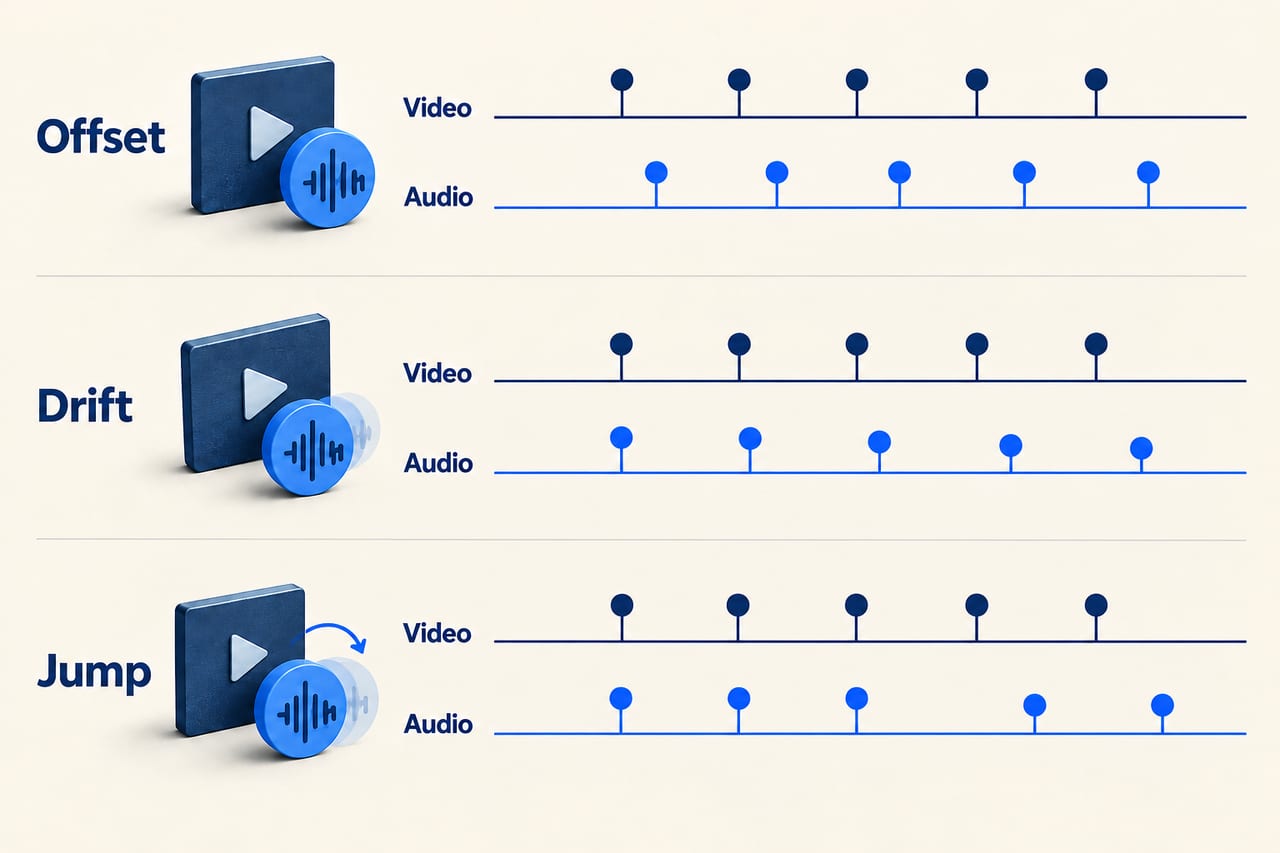
Is it an offset, a drift, or a sudden jump?
Find a visible event with a clear sound, such as a clap, a hard consonant, or an object hitting a surface. Compare one event near the beginning, one near the middle, and one near the end. Do not rely only on whether someone's speech feels slightly strange.
| Pattern | Meaning | First test |
|---|---|---|
| Sound is equally late throughout | A fixed offset is likely | Shift the audio, then check all three points |
| Start aligns, but the gap steadily grows | The tracks may be following different timing or duration | Compare source playback, timestamps, and recording setup |
| Alignment suddenly changes at one point | A cut, dropout, missing section, or timestamp discontinuity may be involved | Inspect the first point where alignment changes |
These patterns are clues, not definitive diagnoses. A recording can have both an initial offset and later drift. Correct and measure them separately.
Step 1: Locate the first stage where sync breaks
Play the original file in another player, then compare the same moments in the editor and exported copy. Use wired audio if you are uncertain whether the listening device is adding a delay. If the source stays aligned but the editor does not, focus on import and timeline timing. If the editor stays aligned but the export does not, investigate the export. If every player shows the same growing mismatch in the source, changing an export preset alone is unlikely to restore the original timing.
Write down the offsets rather than repeatedly dragging the track until it sounds better. For example: beginning 0 seconds, middle 0.8 seconds late, end 1.6 seconds late. That pattern supports a gradual mismatch. Beginning 0.8 seconds late and end 0.8 seconds late supports a fixed shift.
Step 2: Check variable frame rate before changing clip speed
Phone and screen recordings can have variable frame timing. VFR is not automatically broken: a player that follows the timestamps can display the recording correctly. Problems arise when a stage does not interpret those timings as intended.
An Adobe employee's VFR guide describes this source of editing sync problems and discusses transcoding to constant frame rate for certain workflows. The underlying lesson applies beyond one editor: inspect the recording's frame-rate mode and test a timestamp-aware conversion if the source plays correctly but editing does not.
Converting a file to a constant frame rate is different from telling the editor to reinterpret the same frames at a new speed. HandBrake's frame-rate documentation describes preserving source timing and conforming output to a constant rate. Keep the original, convert a copy, and check start, middle, and end before replacing clips in a large project. A conversion cannot reconstruct missing recording data.
Step 3: Consider separate recording clocks
If a camera records video while a separate device records audio, they may not measure elapsed time at precisely the same rate. Both can be set to the same nominal sample rate without sharing one physical clock. A small rate difference accumulates over a long take.
Focusrite explains how independent devices can count samples at different rates, and why synchronization systems matter. For an existing separate recording, start-and-end alignment can reveal whether a small duration adjustment is useful. For future recordings, routing audio and video into one recording workflow or using supported clock synchronization can reduce this class of problem. Neither choice eliminates every possible software or capture fault.
As a hypothetical example, an extra two seconds over twenty minutes represents about a 0.167% duration difference. That is small enough to be hard to notice in a short test and large enough to disrupt lip sync at the end of a long interview. It is an illustration, not a recommended correction for your file.
Step 4: Match the correction to the pattern
- Fixed offset: move one track earlier or later, then verify several points.
- Smooth drift in separate recordings: after aligning the start, adjust the appropriate track's duration to match a clear end event. Preserve pitch when adjusting speech, and check the middle.
- VFR import problem: test a properly converted constant-frame-rate copy that preserves the intended running time.
- Sudden discontinuity: inspect the missing or altered section and repair locally. Stretching the entire track can damage sections that were already correct.
Some editors ask for a speed percentage; others ask for duration. Those controls move in opposite directions: increasing playback speed shortens a clip. Use a known event to confirm the result instead of copying someone else's percentage.
Why “change everything to 48 kHz” is incomplete advice
Sample rate describes audio samples per second; video frame rate describes images per second. They are different settings. Correctly resampling audio from 44.1 kHz to 48 kHz should preserve its intended duration. Merely relabeling a sample rate can change speed and pitch. Matching the displayed numbers also does not force two independent recorders to share a clock.
Check the actual recording and import settings. A persistent pitch change alongside drift suggests a different investigation from a clip that plays at the expected pitch but slowly loses alignment.
Confirm the repair with a full export
Review the exported file near the beginning, middle, and end in a separate player. Also inspect the moments surrounding cuts and any previously identified jumps. A short preview from the beginning cannot prove a twenty-minute file remains synchronized.
Frequently asked questions
Why does shifting the audio fix the end but break the beginning?
That usually indicates changing alignment over time. A shift moves every point equally; it cannot correct two tracks with different durations.
Does variable frame rate always cause audio drift?
No. VFR can work correctly when its timestamps are handled correctly. Treat it as a possibility to test, not a diagnosis based only on the recording device.
Will replacing an MP4 with MOV fix sync?
Not by itself. The container name does not tell you whether the tracks, timestamps, or recording clocks are correct.