
AI Automation ROI: Calculate Cost per Successful Task
Measure AI automation ROI by comparing the full cost of an accepted result with the cost of doing the same work manually. Include software, usage, human review, repairs, maintenance and setup. A task that runs in seconds can still cost more if people spend longer checking and correcting it.
For a small business, the useful question is often narrow: should we automate this one recurring task? A cost-per-task worksheet answers that more clearly than a claim about hours saved across the company. Here is a worked example you can adapt without assuming that an AI agent replaces an employee.
Define one successful task first
Choose a unit of work with a clear finish line. For an invoice workflow, it might be one record entered accurately and accepted by a reviewer. For support, it might be one response meeting your quality rules. “One AI run” is a different unit: a run can fail, repeat a previous attempt or produce an output nobody can use.
Keep quality comparable on both sides. If the manual process produces checked records but the automated process produces unchecked drafts, their costs do not represent the same outcome. Write the acceptance rules before measuring the pilot so the definition of success does not move when results disappoint.
Use a complete cost-per-task formula
Cost per accepted task = total period cost ÷ accepted tasks in that period.
Total period cost includes subscription fees, metered usage, review labor, correction labor, operational maintenance and a stated allocation for initial setup. Use the same time period for costs and outputs. If an attempt fails, its usage and labor still belong in the total, even though it adds no accepted result. Our AI product pricing guide explains the billing units you may encounter when choosing a service.
For cash planning, also record when costs are actually paid. Spreading setup over six months is a planning assumption, while the supplier might charge all of it in the first month. Keep the allocation and the payment schedule visible separately.
A worked example: 400 tasks per month
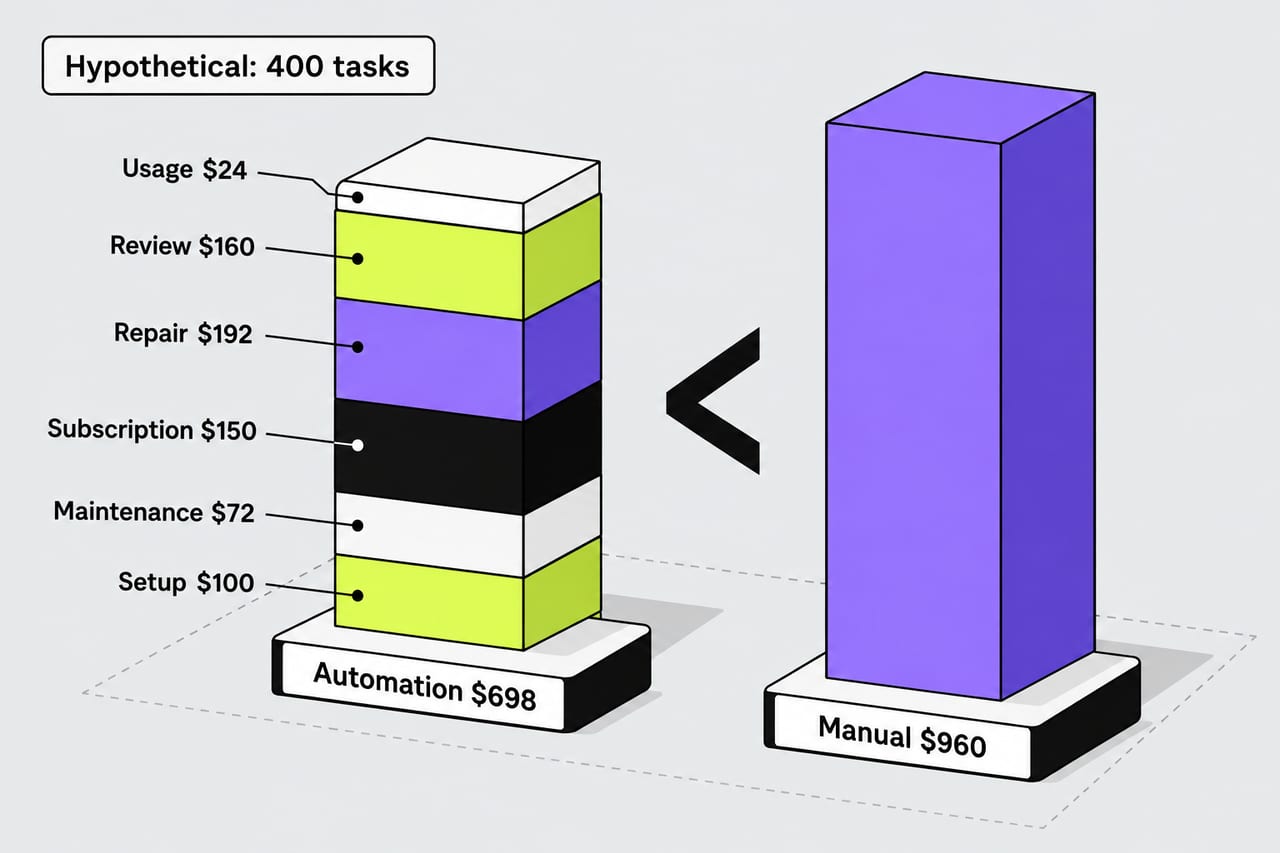
Every number below is a hypothetical assumption, not a vendor quote or an industry benchmark. Assume a manual task takes six minutes and labor costs $24 per hour. Each task therefore costs $2.40 in labor, or $960 for 400 tasks.
The automated workflow processes the same 400 tasks. Every task receives a one-minute review. Twenty percent need an additional six-minute repair. After those repairs, all 400 meet the same acceptance standard as the manual output.
| Automated-workflow cost | Calculation | Monthly total |
|---|---|---|
| Usage | 400 × $0.06 | $24 |
| Review | 400 × 1 minute × $24/hour | $160 |
| Repair | 80 × 6 minutes × $24/hour | $192 |
| Subscription | Assumed monthly fee | $150 |
| Maintenance | 3 hours × $24/hour | $72 |
| Setup allocation | $600 spread over 6 months | $100 |
| Total | All six cost lines | $698 |
That is $698 ÷ 400 = $1.745 per accepted task, approximately $1.75. Compared with the $960 manual baseline, the illustrative monthly saving is $262. The cost reduction is about 27.3% of the baseline.
Only 320 tasks pass without repair, but the final accepted count is 400. Keep those two metrics separate. If some tasks remain unresolved, reduce the accepted-result denominator and include their attempted-work costs. Otherwise, the worksheet rewards a workflow for producing unusable output.
Find the break-even task volume
In this example, usage, review and expected repairs cost $0.94 per attempted task: $0.06 + $0.40 + $0.48. The remaining fixed monthly costs total $322. The manual baseline is $2.40 per task, so the saving available to cover fixed costs is $1.46 per task.
Break-even volume = fixed monthly costs ÷ (manual cost per task − automated variable cost per task).
$322 ÷ $1.46 is approximately 220.55, so the first whole-task volume above break-even is 221 tasks per month. This assumes that time, repair rate and fixed costs stay constant, every task eventually passes, and there are no usage tiers or capacity changes. Real workflows can violate those assumptions.
If automated variable cost already equals or exceeds manual cost, increasing volume cannot cover positive fixed costs under this simple model. You need to improve the process or consider benefits beyond labor savings.
What happens when the repair rate rises?
Keep every other assumption unchanged, but raise repairs from 20% to 50%. Two hundred tasks now need six minutes of repair, costing $480. Total monthly cost becomes $986, which is $26 more than the manual baseline. The tool's speed has not changed; its usable-output economics have.
Under the higher repair assumption, variable cost becomes $1.66 per task. Break-even moves to about 435.14 tasks, or 436 whole tasks. That number is only meaningful if the same quality and cost assumptions hold as volume increases.
Measure repair minutes as well as repair frequency. A workflow with few but expensive exceptions can perform worse than one with frequent tiny corrections. Capture the reason for each repair so you can see whether a change fixes a recurring problem or merely shifts work to another person.
Run a pilot that measures the whole process
- Record the manual baseline. Sample normal work and exceptions. Count active labor separately from waiting time.
- Use the same acceptance rules. Keep a written checklist and record which outputs pass initially, pass after repair or remain unresolved.
- Time review and recovery. Include checking, re-entering data and investigating failures. Do not count a person's time twice.
- Track the bill and maintenance. Include retries, tools and the recurring work needed to keep the connection functioning.
- Compare several scenarios. Recalculate for quieter months, longer reviews and more repairs before committing to a subscription.
The NIST Generative AI Profile recommends measuring performance under conditions similar to deployment. For this worksheet, that means including the messy inputs your business actually receives, rather than measuring only a prepared demonstration.
Does the task need an autonomous agent?
A fixed sequence of extraction, validation and review may be sufficient. Anthropic's engineering guidance recommends starting with a simple solution and weighing the cost and latency introduced by agentic complexity. That principle supports testing the workflow you need before paying for broader autonomy.
Record non-cost benefits separately: faster response, more consistent records or reduced waiting. They can justify a workflow that saves little labor, but they should not be silently converted into cash savings.
Common questions
Are time savings the same as cash savings?
No. Freed time may let an existing team handle more work without reducing payroll. Show recovered capacity separately from an actual reduction in spending.
Should setup be included?
Yes. Show the initial payment and any allocation used in the comparison. State the time horizon, especially when evaluating a short pilot against a longer manual baseline.
Which number should I watch every month?
Track cost per accepted task alongside acceptance rate, review time and repair time. A falling usage bill is encouraging only if the whole process continues to produce the results your business needs.