
How to Add and Fix Captions on YouTube Shorts
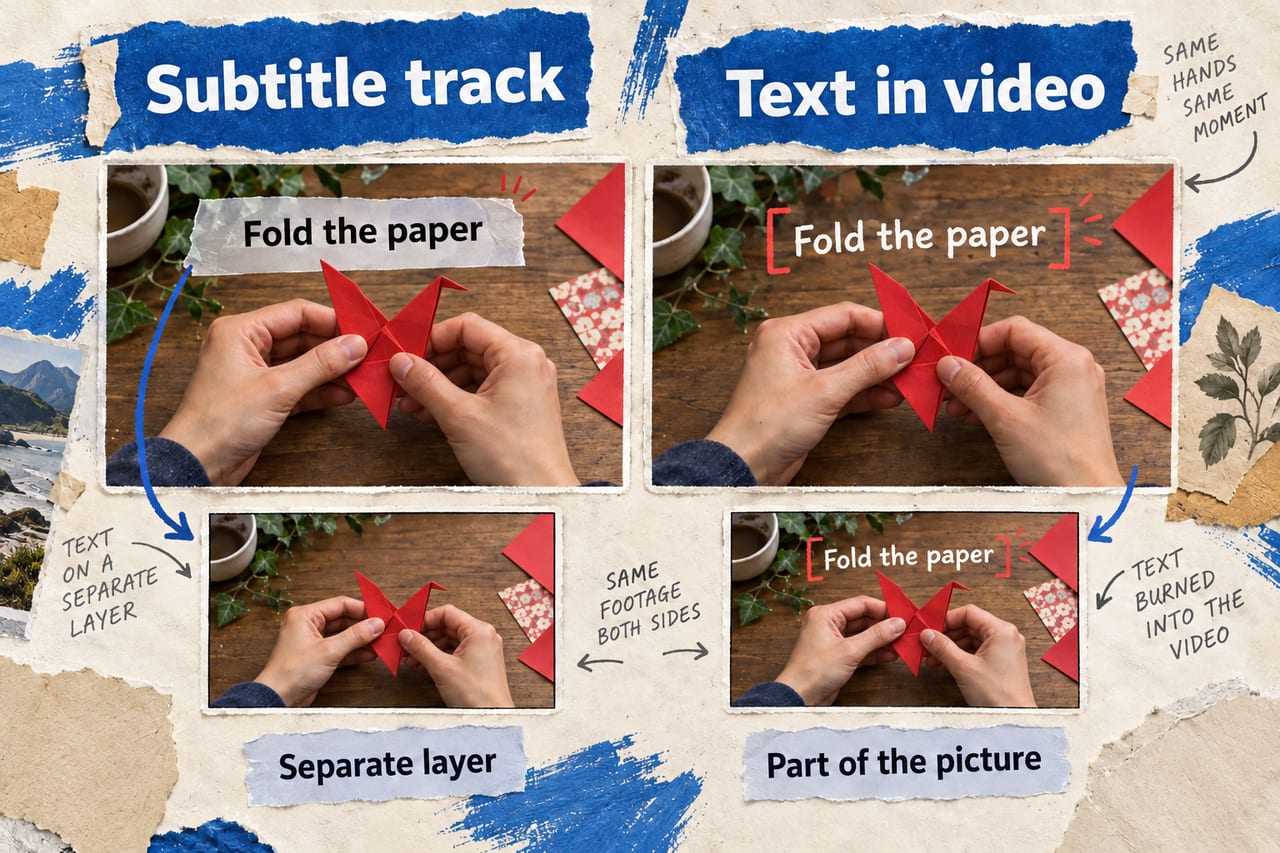
Quick answer: You can add a subtitle track to a YouTube Short in YouTube Studio, review and correct YouTube's automatic captions, or place visible text into the video while editing it. These methods solve different problems. A subtitle track can be switched on or off and edited separately; text burned into the video is always visible and is part of the picture.
Captions help viewers follow speech when sound is off and make videos more usable for people who are deaf or hard of hearing. But a caption with the wrong name, product or instruction can confuse people. YouTube says its automatic system can make errors because of accents, dialects, poor audio and overlapping speech. The fastest workflow is often to use automatic transcription as a first draft, then correct it before sharing the Short widely.
Method 1: add a subtitle track in YouTube Studio
According to YouTube's caption instructions, sign in to Studio, choose Subtitles from the left menu, select the video, choose a language and click Add under Subtitles. You can upload a caption file, use auto-sync with a transcript, or type the words manually. Depending on your account and upload flow, captions can also be added during the upload process.
A caption file with timing gives you control over exactly when lines appear. A plain transcript is quicker when the spoken words are already written down, but still needs review. Manual entry is practical for a very short video. Include meaningful sounds, such as “[door slams],” when they matter to the story rather than transcribing speech alone.
Method 2: fix automatic captions
YouTube says automatic captions can be available for long-form videos and Shorts in supported languages. They may not be ready immediately after upload because processing takes time. In Studio, open Subtitles, select the video and use the menu beside the automatic subtitle track to edit or remove mistakes. Check names, numbers, unfamiliar terminology and calls to action first; those errors can change the meaning of a short clip.
If captions do not appear, YouTube's automatic captioning guide lists possible causes: processing is not finished, the language is unsupported, the audio is hard to recognize, there is a long silent introduction, or speakers overlap. Better sound and a correct video language are useful first checks. Do not assume captions are disabled because an upload has only just completed.
Method 3: add on-screen text in an editor
YouTube Create offers a caption tool that can transcribe speech and put styled text into a video project. Its help page says creators can generate captions, correct words and adjust the visual style. It also says the tool cannot generate captions for clips longer than 60 seconds. Availability varies by device and region, so check whether Create is supported before planning an edit around it.
Text inserted in an editor is often useful for emphasis and a visual hook, but it is not the same as a separate subtitle track. Viewers cannot simply switch it off, and it may cover the subject or interface controls on small screens. Keep important words away from the screen edges, use readable contrast and watch the finished Short on a phone before publishing. When possible, combine a clean video edit with an accurate subtitle track.
A quick quality check before publishing
- Play the Short with sound off. Can a viewer understand its main point?
- Play it with sound on. Do captions match the actual words and timing?
- Check proper names, numbers, links and safety instructions manually.
- Check that text is legible over light and dark frames.
- Preview on a phone so text does not collide with YouTube's interface.
- If you added translated subtitles, ask a fluent speaker to review them before relying on them.
Consider a cooking Short that says “bake at 180°C.” If automatic captions say “18°C,” the article's core instruction is wrong even if most of the transcript is fine. Treat numbers and names as high-priority edits rather than trusting a general accuracy impression.
Frequently asked questions
Does YouTube automatically caption Shorts?
Automatic captions are available in supported languages, but they may take time to process and can contain errors. Review the resulting track.
Can I edit the words after uploading?
Yes. Use the Subtitles area in YouTube Studio to edit the subtitle track. Text baked into the video requires editing and replacing the video asset instead.
Are subtitles and on-screen text identical?
No. Subtitles are timed text tracks; editor text is part of the video image. Both can be useful, but they have different controls and accessibility implications.
Sources and reporting notes
Checked October 3, 2026: YouTube: Add subtitles and captions; YouTube: Automatic captioning; YouTube Create caption tool. The cooking example is illustrative.