
6 GitHub Projects That Fit Together Into a Self-Hosted App Stack

Dokploy, Traefik, authentik, Infisical, Beszel and Uptime Kuma make a useful reading list for anyone building a self-hosted app stack. Together, they address six connected jobs: deploying applications, routing traffic, controlling human access, managing application secrets, observing resources and checking availability.
Start with Dokploy if your immediate problem is getting an application deployed. It already integrates Traefik, so those two entries describe connected parts of the same setup. Add the other projects when their role solves a problem you actually have.
How these six projects were chosen
This selection is based on the projects' own repositories and documentation, checked in September 2026. Each has a clear role in hosting and operating a web application. The list combines newer projects such as Dokploy and Beszel with established foundations; it is not a claim that all six launched this year.
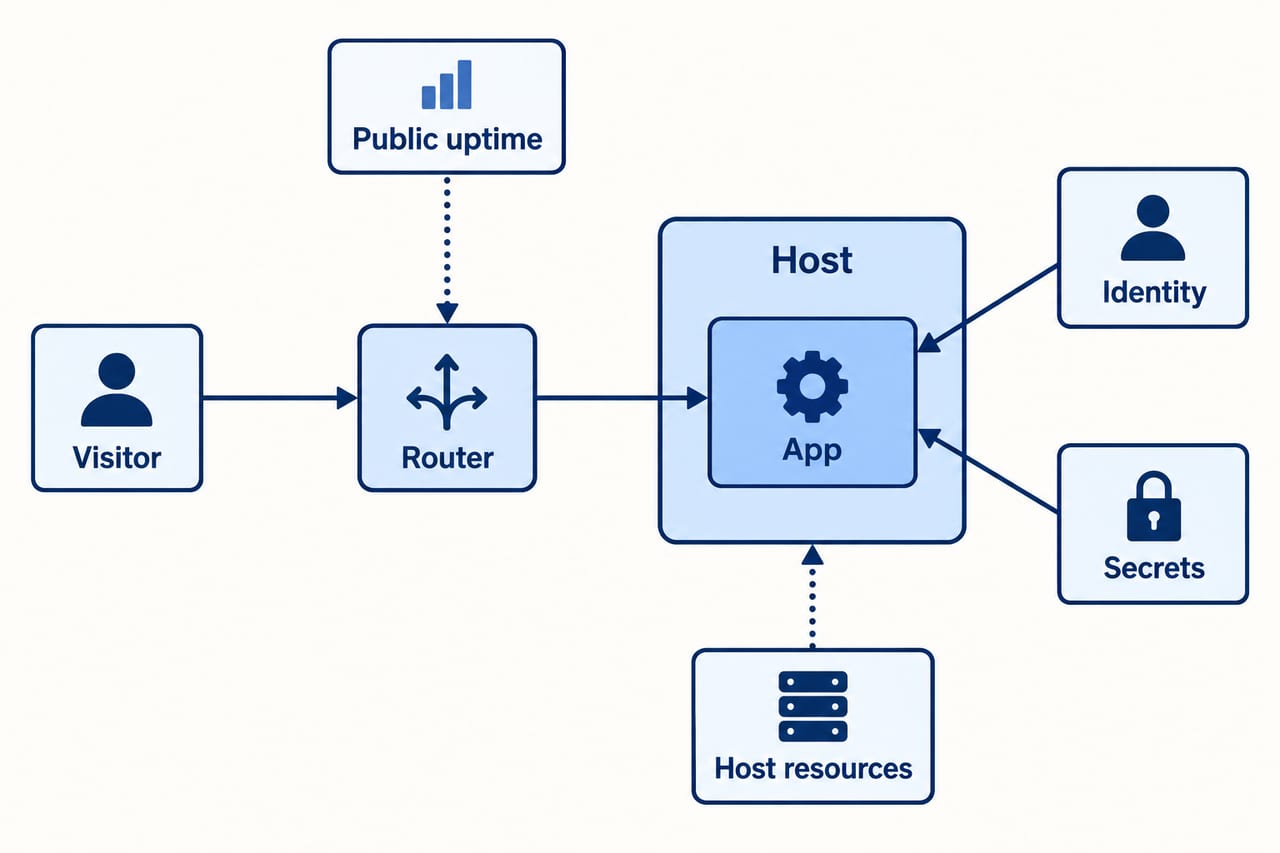
The stack below is an architectural proposal, not a tested bundle or a one-click compatibility promise. The interesting part is how the responsibilities fit together. You can adopt a project individually without committing to the whole collection.
1. Dokploy: the deployment control panel
Dokploy is a self-hostable platform for deploying and managing applications and databases. Its repository documents Docker Compose support, database backups to external storage and integration with Traefik for routing and load balancing.
It suits a developer or small team that wants a control panel for a containerized application. In our example, a small publishing site has a frontend, an API and a database. Dokploy would provide the place to deploy and inspect those services.
The practical limitation is ownership: a deployment interface does not remove responsibility for the server underneath it. Before adding a second app, write down how to restore the first one, where its persistent data lives and who receives deployment failure alerts. A repeatable recovery process makes the dashboard more useful.
2. Traefik: the traffic router underneath
Traefik is a reverse proxy and load balancer. It can discover services from supported infrastructure, update routing dynamically and provide HTTPS through Let's Encrypt. Dokploy's domain documentation explains its own routing setup.
For the publishing site, the public domain should lead to the frontend, while a dedicated API route should reach the API. Database traffic should remain inside the deployment's private network. The router is where those choices become explicit.
If you use Dokploy, understand its existing Traefik configuration before installing another proxy. Two services competing for the same public ports create an avoidable puzzle. Check your domain routes after each change, including a route that should be rejected. A successful homepage request does not tell you whether an internal dashboard has become reachable.
3. authentik: one place for human identity
authentik is a self-hosted identity provider supporting protocols including SAML and OAuth2/OIDC. Its Traefik integration guide documents how a proxy provider can work with Traefik.
It belongs in the stack when several private tools need a coherent login process. A team member could use a shared identity to access internal dashboards, subject to the permissions you configure.
The limitation is that login and authorization remain different decisions. Passing an identity check should not automatically grant every user access to every tool. Map the applications and roles first, then test with a normal account as well as an administrator. Keep a documented recovery path for a situation in which the identity service itself is unavailable.
4. Infisical: a home for application secrets
Infisical provides secrets and configuration management. Its repository describes separating environments, tracking secret versions and delivering secrets to applications. Some capabilities and deployment options have different license or plan requirements; check the current terms for the features you need.
The distinction from authentik is straightforward: authentik handles people signing in, while Infisical can help organize the credentials your applications use. In the publishing site, those might include an email service key and a database password.
Adding a secrets service also adds something that needs securing and recovery. Decide how a fresh server obtains its initial credentials, who can retrieve production secrets and how you recover access after a failure. Do not create a deployment process that depends on reading a secret from an application that cannot start until it has that secret.

5. Beszel: a view of the machine's resources
Beszel is a lightweight server monitoring project with historical data, Docker statistics and configurable alerts. Its architecture documentation describes container resource history and a hub-and-agent approach.
It is useful when the question is why a site became slow or why a container restarted. A history of memory, CPU and disk usage gives you a place to begin investigating. For a small server, that can be easier to operate than building a much larger metrics system.
Beszel also supports network probes, so its role can extend beyond resource charts. For this proposed stack, use it to investigate the application server and containers. A probe running on that same server has a different viewpoint from a visitor connecting over the public internet. Choose a small number of actionable alerts and give each an owner and a next step.
6. Uptime Kuma: a check from the visitor's side
Uptime Kuma is a self-hosted availability monitor. Its repository lists HTTP and TCP checks, notifications and status pages. HTTP checks can also look for a keyword or inspect a JSON response.
For the publishing site, monitor the homepage and a meaningful API check. A page returning a success status but displaying an error message should not necessarily count as healthy. Pick a check that represents something readers actually need.
Consider putting Uptime Kuma on a separate machine or provider. If the application and monitor share the same failed server, the monitor may disappear with the service it is supposed to observe. Beszel and Uptime Kuma overlap in some checks; the reason to use both here is to keep resource investigation near the application and availability checks outside it. If an existing external monitor already does that job, you can skip Kuma.
How the stack fits together
| Project | Main responsibility | Question it helps answer |
|---|---|---|
| Dokploy | Deployment | Which application version is running? |
| Traefik | Traffic routing | Which service should receive this request? |
| authentik | Human identity | Who is signing in to this private tool? |
| Infisical | Application secrets | How does this service obtain its credentials? |
| Beszel | Resource observation | What is happening inside the server? |
| Uptime Kuma | Availability checks | Can a visitor reach a working endpoint? |
A sensible first phase is the application, Dokploy's existing routing and an availability check. Once that works, add resource history. Introduce shared identity and a secrets service when the number of users, applications or credentials justifies their ongoing maintenance.
What this collection does not provide automatically
Six repositories do not create high availability, a recovery policy or a secure configuration by themselves. For the example site, keep a restorable database backup outside the application server and test a restore into a disposable environment. Record which files and credentials are also required.
Before installing, review each project's license, stable release instructions and supported upgrade path. This article does not prescribe a floating latest container tag or a shared minimum server size. Resource requirements depend on the applications and the services you actually enable.
Common questions
Do I need all six to host a blog?
No. Use the list as a map of responsibilities. A small personal site may need only deployment, routing and an external availability check. More tools are worthwhile when they remove recurring operational work.
Is this a replacement for managed hosting?
It is an option for people willing to operate their own infrastructure. Compare the server bill and maintenance time with the features you receive from managed hosting. The right choice depends on how much control you need and who will handle failures.
Sources and reporting notes
The six repository links above are the primary sources for project capabilities. The linked Dokploy, authentik and Beszel documentation supports the routing, proxy integration and monitoring details. Sources checked September 28, 2026. Selection, deployment order and the publishing-site example are Izood's analysis; the combined stack has not been installed or benchmarked for this article.